UI Trends 2025: Top 10 UI Design Trends for new Website
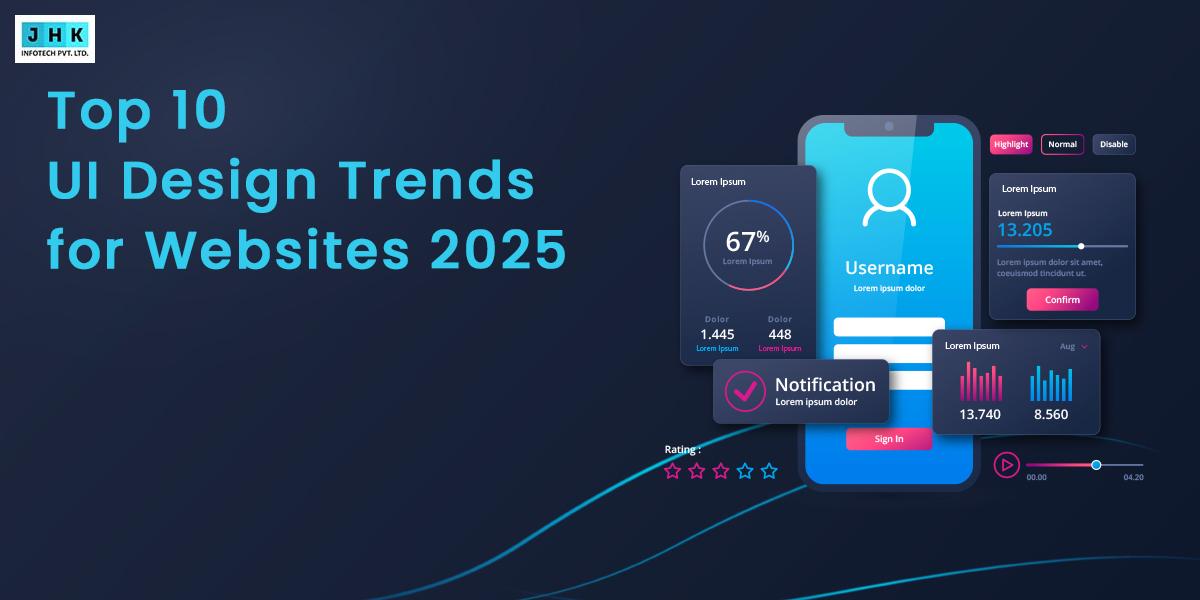
Staying ahead in the digital world means keeping up with evolving user expectations—and at the heart of it all lies great UI design. As we enter 2025, the landscape of user interface design is undergoing exciting transformations, blending aesthetic innovation with user-centric functionality. From the return of skeuomorphism to the rise of immersive microinteractions, UI trends are now driven by the demand for intuitive, accessible, and emotionally engaging digital experiences.
In this blog, we explore the top 10 UI design trends of 2025 that are shaping everything from mobile apps to web interfaces. Whether you’re a UX/UI designer, developer, or brand strategist, these insights will help you stay on top of design shifts and create interfaces that stand out in a crowded digital marketplace.
1. Skeuomorphism Makes a Comeback
Skeuomorphism, once considered outdated, is making a stylish and strategic return. Rather than mimicking real-world objects with excessive visual noise, the 2025 version of skeuomorphism is cleaner, smarter, and purpose-driven. It employs realistic textures, nuanced lighting, and dimensional depth to replicate the familiarity of physical materials within digital environments.
This trend is particularly gaining momentum in user interface design for mobile apps, wearable devices like smartwatches, and immersive digital spaces such as augmented reality interfaces. With high-resolution displays and improved rendering engines, designers are crafting interfaces that simulate touch and materiality, making interactions more intuitive and emotionally resonant.

Why Skeuomorphism Matters in 2025
Skeuomorphism bridges the gap between digital interfaces and human familiarity, enhancing usability and emotional connection. It brings back a sense of comfort and ease for users by simulating real-world objects, which reduces the learning curve and increases accessibility. This familiarity can foster trust in digital products, particularly in industries like health tech and finance, where users benefit from clarity and predictability.
What Sets Modern Skeuomorphism Apart
- Recreates tactile realism digitally
- Enhanced with subtle shadows, depth, and textures
- Effective in AR/VR, smartwatches, and apps needing realism
2. The Power of Minimalism in Digital Aesthetics
Minimalism is far from basic—it’s a refined approach that places focus on clarity, efficiency, and user intent. In 2025, minimalism continues to dominate UI design styles but with elevated sophistication. Designers are embracing more expressive color palettes, intentional use of white space, and powerful visual hierarchy to guide users effortlessly.
This trend aligns with the need for faster digital experiences. Fewer elements on the screen mean quicker loading times, reduced distraction, and improved comprehension. But today’s minimalism isn’t rigid or bland. It includes dynamic elements like smooth transitions, animated icons, and interactive microelements that maintain visual interest without overwhelming the user.

Brands using minimalism in UI benefit from cleaner interfaces that direct user attention precisely where it’s needed—ideal for mobile-first design and accessibility. In essence, it’s less about stripping design down and more about elevating what truly matters.
Why Minimalism Matters in UI Design
Enhances clarity, speeds up user tasks, and improves device performance for modern users.
Why Elevated Minimalism Still Leads
- Focuses on user intent and clarity
- Uses negative space strategically
- Enhances performance and accessibility
3. Flat Design Evolution
Flat design, once revolutionary for its rejection of skeuomorphic visuals, is now undergoing a thoughtful evolution. The 2025 version of flat design maintains its core simplicity but adds subtle enhancements that improve depth, functionality, and storytelling.
Designers are incorporating faint shadows, layered backgrounds, and micro-interactions to introduce hierarchy without losing the clean appeal of flat UI. The goal is to create an interface that feels both modern and interactive. These changes are especially effective in mobile UI, where clarity and performance are paramount.

The evolution of flat design also includes bolder color palettes, larger interactive zones, and smoother transition effects. This enhanced version is not only visually pleasing but also supports user expectations developed from years of touch interaction.
Why Flat Design Still Matters
Merges clean visuals with user interaction improvements, ideal for mobile and performance-focused designs.
How Flat Design Is Being Reimagined
- Simplicity enhanced with subtle dimensionality
- High-contrast colors and interactive layering
- Maintains fast performance in mobile UIs
4. Bauhaus Style Meets Digital UI
The Bauhaus movement, known for its harmony between function and form, is inspiring a new wave of digital interfaces. This style features geometric precision, bold color blocking, and a strict adherence to grid systems—all of which lend themselves well to digital design principles.
In 2025, Bauhaus-style UI is finding its place in dashboards, portfolio websites, design tools, and even mobile apps. Designers are leveraging this style to build interfaces that are not just aesthetic but also rigorously functional. Elements like asymmetric layouts, sans-serif typography, and repetitive visual motifs add a sense of consistency and balance.

Why Bauhaus Design Matters Now
Balances artistic design with practical structure, offering clean, usable, and modern interfaces.
What Makes Bauhaus UI Stand Out Today
- Functional yet artistic interfaces
- Strong alignment, symmetry, and balance
- Ideal for dashboards and design-centric sites
5. Bold Typography Commands Attention
Typography has moved from a supporting role to a starring act. In 2025, bold typography is being used to define brand identity, improve readability, and drive emotional impact. From oversized headlines to animated fonts, the possibilities for expressive text are expanding.
Designers are using variable fonts that adapt in real time, responsive type scales that change with device resolution, and even kinetic typography that animates based on user interaction. These innovations make typography more than just visual decoration—they turn it into a dynamic interface element.

Why Bold Typography is a 2025 Essential
Helps brands stand out, improves UX, and adds interactivity through dynamic visuals.
How Typography Is Transforming Interfaces
- Typography as a visual anchor
- Variable and kinetic fonts improve engagement
- Works well in minimalist interfaces
6. Neumorphism: Soft Shadows & Subtle Depth
Neumorphism, often described as the lovechild of skeuomorphism and flat design, continues to evolve in 2025. Characterized by soft, extruded surfaces and delicate inner/outer shadows, neumorphism gives UI elements a tactile, “molded” look that invites interaction.
Used carefully, neumorphism can create intuitive toggles, buttons, and cards that feel physically embedded in the interface. However, designers must navigate its inherent accessibility challenges—especially its tendency toward low contrast. Recent adaptations involve higher contrast ratios, more vivid color pairings, and fallback states for accessibility tools.

Why Neumorphism Deserves Attention
Adds softness and depth to digital controls while offering a unique look that stands out.
What’s Driving Neumorphism’s Resurgence
- Realistic yet sleek controls
- Needs high contrast to ensure accessibility
- Suitable for settings, profile screens, or experimental UIs
7. Glassmorphism: Transparency Reimagined
Glassmorphism is the art of simulating frosted glass with layered transparency, background blur, and semi-transparent fills. It’s often combined with vivid background images or gradients to create a dreamy, futuristic aesthetic.
This style is being used in modals, cards, login forms, and profile previews where designers want to separate UI elements without losing background context. Glassmorphism lends depth to otherwise flat interfaces and works especially well in dark mode settings, where contrast plays beautifully against blurred transparency.

Why Glassmorphism Is Gaining Popularity
Combines depth and elegance in tight UI spaces, ideal for layered app designs.
Why Glassmorphism Is Gaining Ground
- Depth without clutter
- Adapts well to both light and dark modes
- Ideal for overlays, modals, and widgets
UI trends work best when adapted to real user behavior, which is why experienced UI/UX design services focus on applying trends that improve usability—not just aesthetics.
8. Animation and Motion for Better UX
Motion is no longer just an aesthetic add-on. It’s a core part of storytelling, feedback, and flow. In 2025, motion design is about meaningful transitions, delightful microinteractions, and purposeful animation that enhances usability.
When implemented with care, motion guides users, confirms actions, and reduces cognitive load. Subtle animations on form validation, loading spinners, hover states, and navigation provide valuable feedback. More advanced UI now incorporates animated layouts that respond to user context in real-time.

Why Motion Design Enhances Usability
It delivers smoother, more intuitive user journeys and highlights user interactions.
Key Ways Animation Enhances Interaction
- Motion as feedback and guidance
- Enhances perceived speed and clarity
- Reduces cognitive friction in user journeys
9. Illustration: Custom Visual Narratives
Illustration is reclaiming its place as a storytelling powerhouse in UI design. Hand-drawn graphics, vector scenes, and 3D-rendered characters are being used to inject personality and clarity into interfaces.
Unlike generic stock photos, custom illustrations build brand uniqueness and support user comprehension. They are especially effective in onboarding screens, empty states, and hero sections where they can explain complex concepts visually.

Why Illustration Strengthens UI Design
Makes interfaces emotionally engaging and helps simplify complex user flows.
How Illustration Elevates UX
- Builds emotional connections
- Explains complex ideas visually
- Reinforces brand personality
10. Dark Mode 2.0
Dark mode has matured into a highly refined, user-driven design standard. Once a stylistic option, it’s now expected functionality. In 2025, dark mode adapts dynamically based on time of day, ambient light, or device settings—creating a more comfortable user experience.
Modern dark UIs leverage carefully selected color palettes, high-contrast elements, and optimized readability. They reduce eye strain in low-light environments and often contribute to battery efficiency on OLED screens.

Why Dark Mode Remains Relevant
Improves visual comfort, reduces fatigue, and personalizes experiences based on user preferences.
What Makes Modern Dark Mode Smarter
- Adapts to user environment in real time
- Reduces eye strain and saves battery
- Advanced accessibility enhancements included
FAQ’s
Q.1: What is the UI design process?
The UI (User Interface) design process involves designing the visual structure and interactive components of a digital product, including elements like buttons, icons, menus, and screen layouts. It typically includes the following steps:
- Research: Understand user needs, market trends, and platform guidelines.
- Wireframing: Develop basic layouts and structure.
- Prototyping: Build interactive mockups to test flow and usability.
- Designing: Create high-fidelity visuals with branding, color, typography, and interaction states.
- Usability Testing: Evaluate the design with real users and make improvements based on their feedback.
- Handoff & Iteration: Deliver assets to developers and iterate based on analytics or user feedback.
Q.2: What defines a good user interface?
A good user interface is user-friendly, aesthetically pleasing, and simple to navigate. It helps users accomplish their tasks efficiently without confusion or frustration. Key elements include:
- Clear layout and navigation
- Consistent visual language
- Responsive and accessible design
- Feedback on user actions (e.g., loading states, confirmations)
- Visual hierarchy to guide attention
Q.3: Why do we prototype the user interface design?
Prototyping is essential to validate UI concepts before development. It allows designers to:
- Test usability and navigation flows
- Identify friction points early
- Receive stakeholder and user feedback
- Save time and development cost by avoiding rework
Prototypes also help teams align on design direction and interactions.
Q.4: How does a UX designer differ from a UX researcher?
- UX Designer: Focuses on creating the product’s experience through wireframes, user flows, and interface layouts. Their goal is to ensure the product is functional, enjoyable to use, and highly efficient.
- UX Researcher: Gathers insights through surveys, interviews, usability testing, and analytics. They analyze user behavior and preferences to inform and shape the design strategy.
Q.5: How to create a user interface design?
To create a UI design:
- Understand the user: Define personas and goals.
- Plan layout: Sketch or wireframe the structure.
- Apply visual style: Implement visual styling through color schemes, typography, and brand elements.
- Design interactivity: Define how buttons, sliders, and transitions work.
- Use design tools: Utilize design tools such as Figma, Adobe XD, or Sketch to create and refine UI layouts.
- Test and iterate: Refine the design by gathering feedback and conducting iterative testing.
Q.6: What are the ten essential principles of effective UI design?
- Keep it simple and consistent
- Design for user goals
- Use familiar patterns
- Ensure clear visual hierarchy
- Make navigation intuitive
- Provide feedback for actions
- Minimize user effort
- Focus on accessibility
- Prioritize content clarity
- Test and adapt based on real usage
Q.7: What is the 6-3-1 rule in UI design?
The 6-3-1 rule is a brainstorming framework used in design sprints. It encourages ideation by having:
- 6 ideas sketched by each team member
- 3 of those selected and refined
- 1 final concept chosen to move forward
This helps generate diverse UI ideas quickly and align the team on the best direction.
Q.8: What is the 80/20 rule in UI/UX design?
The 80/20 rule (Pareto Principle) in UI/UX means that 80% of users typically use only 20% of a product’s features. Designers focus on optimizing the most-used features to enhance performance, usability, and satisfaction.
Recent Post
-
September 16, 2026
Multimodal AI: How AI Is Learning to See, Hear, Speak and Understand
-
September 11, 2026
AI Employees: How Businesses Are Building Digital Workforces in 2026
-
September 7, 2026
What Is GEO? The Future of SEO in the Age of AI Search
-
-
February 26, 2026
AI Trends 2026: Latest AI Innovation, Developments & Predictions